
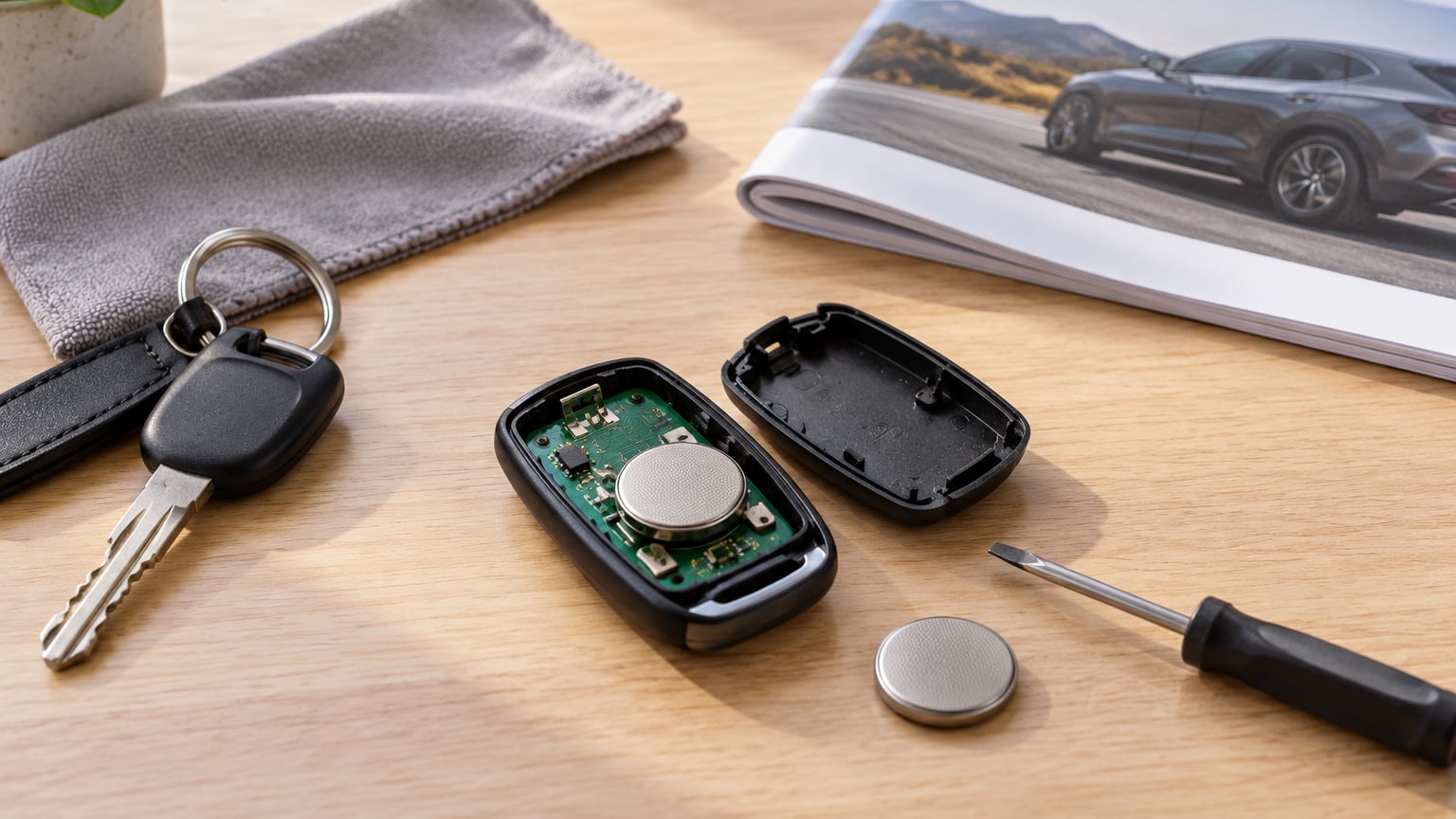
If your key fob is not working, start with the battery. Most dead fobs are a flat coin cell, usually a CR2032 or CR2025, and swapping it takes about five minutes with a small screwdriver or a plastic pry tool. If a fresh battery does not bring it back, the problem is somewhere other than the cell, and the order you test things decides whether you solve it yourself or pay a dealer to reprogram a fob that never needed coding.
Most of the failures fall into one of two buckets. The fault is either on the fob side, which means the battery, contacts, buttons or circuit board, or it is on the car side, which means the receiver module, an antenna, wiring or a fuse. A dead fob also stops the engine on vehicles with a transponder chip and an immobiliser, because the car needs to see a recognised signal before it will crank. Getting into the car in the meantime is usually possible through the emergency key blade or the mechanical key hidden in the fob housing.
This guide walks the diagnostic order that works: confirm what is failing, test the battery, look at contacts and moisture, rule out interference, check sync and settings, inspect the vehicle side, and only then look at programming. It takes roughly 30 minutes end to end and costs nothing but a coin cell.
Table of Contents
- What You Need
- Key Fob Not Working How to Fix: 7 Steps to Try
- Step 1: Confirm Exactly What Is Failing Before You Buy Parts
- Step 2: Check the Key Fob Battery
- Step 3: Inspect Contacts, Buttons and Moisture Damage
- Step 4: Rule Out Signal Interference
- Step 5: Check Sync, Remote Start and Car Settings
- Step 6: Inspect the Vehicle Receiver, Fuse and Car Battery
- Step 7: Work Out Whether the Fob Needs Programming
- Common Mistakes to Avoid
- Frequently Asked Questions
- Conclusion
What You Need
You do not need much, and most of it you probably already have. The list below is the full kit.
- The vehicle owner’s manual or the workshop manual for your model
- A replacement coin cell matching the type marked on the fob case or the battery compartment
- A small flat screwdriver, a Phillips driver, or a plastic opening tool for prying the housing apart
- A flashlight, since fob seams are hard to see in a dark garage
- A clean lint-free cloth and a little isopropyl alcohol for contacts
- A multimeter, only if you intend to move on to the vehicle-side checks in Step 6
Battery type, the way the housing opens and the programming requirements all change between makes, models and years. A 2018 BMW fob with a sealed rechargeable pack behaves nothing like a 2014 Dodge Ram fob with a screw-in CR2032, and a Toyota smart key pairs differently from a Ford fob. Read the owner’s manual for the fob change before you pry anything. If the manual says the module is sealed or the battery is not user replaceable, stop there rather than forcing the case open.
Key Fob Not Working How to Fix: 7 Steps to Try
Work through these in order. Each step costs a few minutes and each one rules out a group of causes, so a step that seems unnecessary usually saves you from opening a part you did not need to open.
Step 1: Confirm Exactly What Is Failing Before You Buy Parts
Say out loud what the fob is doing, because the symptom points straight at the fault. A fob that does nothing at all is usually the battery. A fob that works from two feet away but not from ten is a weak cell or a corroded contact. A fob where only one button needs a hard press is a worn microswitch under that button. A fob where lock works but the trunk release does not is usually a button contact, not a dead battery.
Then check whether the car also recognises the mechanical key. Put the key blade in the door cylinder and turn it. If the door opens with the blade but not with the remote, the locks and the security system are fine and the issue is upstream in the transmitter or the receiver.
Two more tests cost nothing and settle most arguments. If you have a spare fob, press its lock button and see whether the car reacts. If the spare also fails, the fault is probably car-side. Ask a neighbour to stand near their car and press their remote; if several fobs fail in the same spot, something in that location is interfering with the signal.
Step 2: Check the Key Fob Battery
Read the battery type before you buy anything. Most fobs take a CR2032, and a good number take the shorter and thinner CR2025. They are the same 3 volts and the wrong one will not physically fit, but plenty of people buy the wrong size because a generic car key fob battery listing never mentions the diameter. The marking is on the fob case, on the old cell or in the manual. Never guess here; a coin cell of the wrong diameter simply will not seat and the fob behaves as if it has no battery.
To replace it, note the polarity before you lift the old cell out. The plus sign on the flat face of the cell goes toward the side marked plus on the holder or, on fobs that show none, toward the metal side of the contact. Press the new cell in with a fingertip rather than a tool so you do not gouge the terminal, then close the housing and press a button a few times before walking back to the car. A battery that has been sitting for years can take a moment to settle, so give it a few attempts at close range before assuming the swap failed.
The symptoms of a weak cell are consistent enough to trust. Short range, an intermittent response, a delay before the doors unlock, a low battery or key fob battery message on the dash, and a fob that takes several presses are all the same fault wearing different hats. If the fob is completely dead and the mechanical key still opens the door, the cell is the first and usually last thing you need to replace.
Step 3: Inspect Contacts, Buttons and Moisture Damage
If a new battery produced nothing, take it back out and look at what the old one left behind. Leakage from a coin cell shows up as white or green crust around the holder, a sticky residue on the plastic or a metal tab that no longer springs up against the cell. That is a different repair from a dead cell. Clean the holder and the contact plate with isopropyl alcohol and a soft brush, then bend any flattened tab back up gently with tweezers so it presses against the battery face. Corrosion that has already eaten through the metal means the module is finished and the fob needs replacing rather than cleaning.
Check the buttons while you have it open. Press each one and listen for the click of the microswitch underneath. A switch that feels mushy, stays down or needs unusual pressure has failed, and no amount of new battery will bring it back. Some owners get those switches resoldered or swap the housing and board rather than buying a whole new fob, which is a soldering job for a locksmith or electronics bench, not a first attempt at the kitchen table.
Water damage looks like this: the fob got wet in the rain, in a pocket, or dropped into a puddle, and now it is erratic or dead. Disconnect the vehicle battery before handling anything near the vehicle side of the system, then open the fob, let it dry fully and clean the board with isopropyl alcohol. Alcohol and time fix more wet fobs than people expect. Salt residue left behind is the thing that keeps draining a battery, so clean it and give the board a day or two before it goes back in your pocket. If the case is cracked or the antenna trace is corroded through, stop; that is a replacement, not a repair.
Step 4: Rule Out Signal Interference
A keyless entry fob is a small radio transmitter, and radio signals can be blocked or drowned. Parking garages, multi storey car parks, concrete walls, lift shafts and metal buildings all reduce range. A bad neighbour or a malfunctioning repeater can sit on the same frequency and swallow your signal. LED lighting electronics, poorly grounded aftermarket alarm systems, car stereos and some charging pads have been blamed in owner reports as well.
Test whether the problem follows the car or the location. If the fob works normally at home and fails in the same underground car park every week, the car is fine and the environment is the problem. If it fails at home and works in a different car park, look at the fob. Walk toward the vehicle in the open with the fob held at waist height and press the button repeatedly, and try again a few feet to the left and right of the door handle; if one position works and another does not, you have a marginal fob or a marginal antenna in the car. Re-test again in a week. Interference is not fixed by any permanent change, so the real fix is using a working fob and treating the location as the limitation.
Step 5: Check Sync, Remote Start and Car Settings
Some fobs need a short re-synchronisation after a battery change, and owners describe a simple timing routine that brings it back: insert the key into the ignition, turn it on for a few seconds, then back off, then repeat a couple of times, or with a push-to-start vehicle hold the start button without pressing the brake for a few seconds to wake the system. It is not a programming procedure and it does not write new codes to the vehicle, but it does reset the fob’s expectation of what the car is doing.
Remote start is the function that most often fails on its own. On many vehicles it needs a press and hold rather than a single tap, and a few need the button held for two seconds. Some fobs require lock to be pressed first, or require the doors to be fully closed and the hood and trunk latched, and a cold engine will refuse a remote start without a clear code. Confirm the doors lock and unlock normally first, then worry about the start function.
Vehicle settings get in the way more often than people expect. A clock that has drifted after a battery disconnect, a phone paired over Bluetooth, an accessory that has grabbed the same button command, or an aftermarket alarm can all block or reroute one remote function. Walk back through the vehicle settings and accessory menus covering remote start, proximity unlock and keyless entry, and re-enable anything that got switched off. Menu names and locations differ by make, model and year, so use the manual rather than a generic menu path.
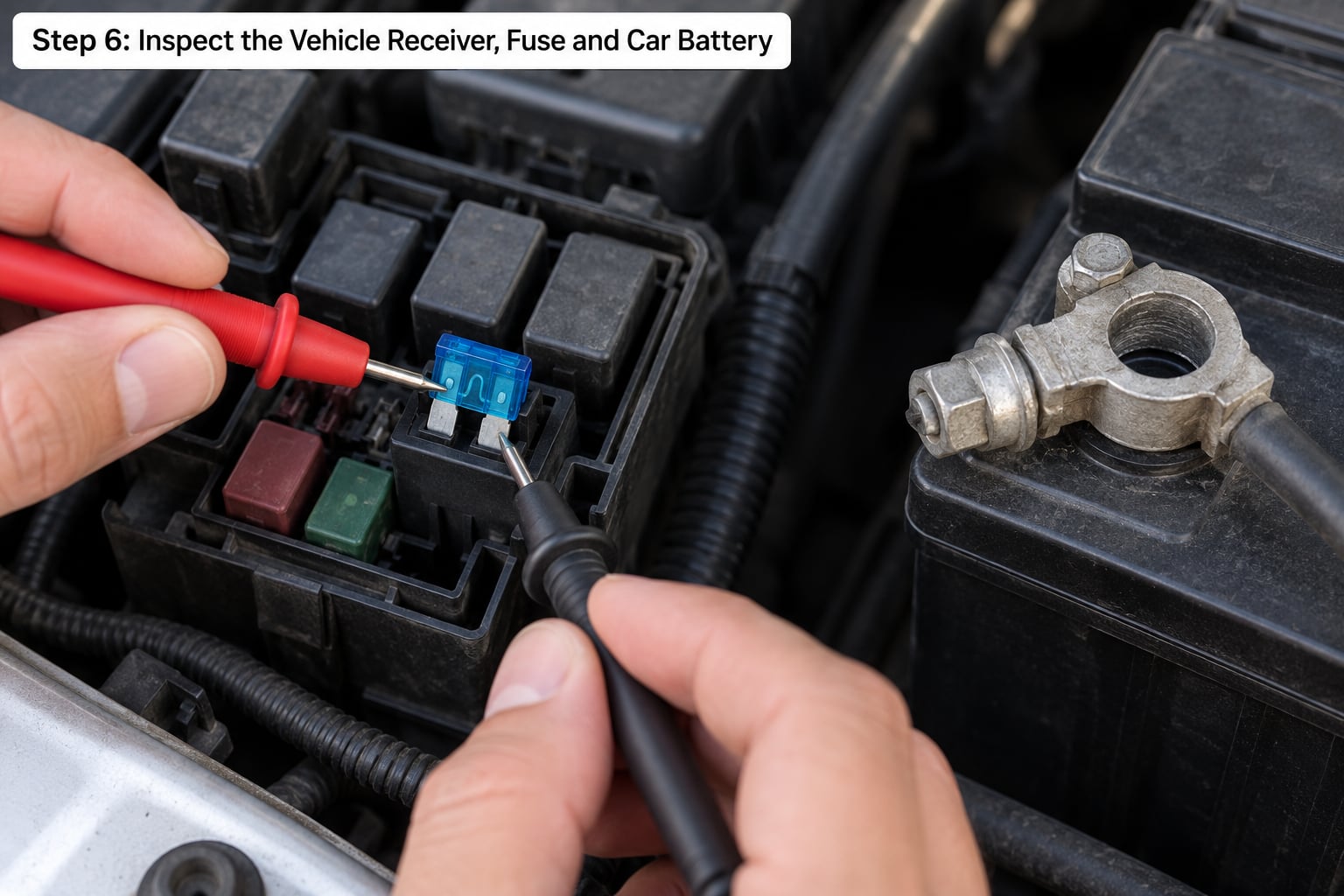
Step 6: Inspect the Vehicle Receiver, Fuse and Car Battery
Move to the car side when the fob is not the problem: the spare fob fails too, the doors work from the inside switch, or the car shows warning lights that did not appear before. A receiver module, an antenna or a wiring fault usually brings other symptoms with it. Watch for a check engine light, an immobiliser or key warning, a security light that stays on with the engine off, a clock that resets to 1 January, or several unrelated electrics failing at once. Mechanics report that a low or failing car battery is regularly mistaken for a dead fob, and the pattern fits: a flat car battery can stop the receiver waking up while the fob itself is fine.
With the vehicle battery disconnected, you can pull the relevant fuse and inspect it visually for a blown element, and you can check the car battery’s resting state with a multimeter. An engine-off rested battery sitting near full charge is the reference point; well below that, the battery wants charging or replacement before you blame anything wireless. If you are unsure what a reading means, stop and get an automotive electrician rather than guessing. Working inside a fuse box with the battery connected risks blowing the electronics in the car, and a misdiagnosed module swap is far more expensive than a shop visit.
Other electrical faults on the car side show up in ways that surprise people. A door that locks by hand but not by remote usually points at the lock actuator or the wiring to it rather than the fob. Our guide to why a speedometer stops working follows the same logic: a dead gauge plus a dead fob means the supply or the module, not the remote.
A cooling system that behaves oddly alongside the electrical symptoms is a separate but related branch. The checks in how to tell if a radiator fan is not working follow the same logic as Step 6, using fuses and electrical state rather than assuming a single part is guilty.
Step 7: Work Out Whether the Fob Needs Programming
Swapping a battery does not require programming. The fob keeps its pairing with the car, and if the buttons work at close range after a cell change, it is paired. Anything that suggests coding is needed after a battery change points somewhere else: dirty contacts, a cell installed backwards, a cell that arrived dead, a worn button or a car that needs a re-sync.
A replacement fob is a different question. Most fobs bought as an aftermarket part have to be coded to the vehicle, either through an onboard self-programming routine that requires one already working fob in the car, or with diagnostic equipment. Some vehicles will pair a new fob through the owner’s menu on their own; plenty of others will not. Before buying anything, check the compatibility and the coding requirement by VIN with the dealer or a reputable automotive locksmith, and ask whether the car has a self-programming procedure at all. Cheap unbranded programmable fobs from a marketplace listing are the ones that never pair properly and cost you a second purchase plus a coding visit.
Common Mistakes to Avoid
Almost every expensive fob job started with a small avoidable error. These come up again and again.
- Prying a sealed fob with a metal screwdriver. A flat blade slips, crosses the case and can slice a trace on the board. Use a plastic opening tool or a thin plastic card, and work the seam gently around all four sides.
- Installing the wrong cell or reversing the polarity. Check the marking instead of assuming, and confirm the plus side before you close the case. A backwards cell can make a good fob look completely dead.
- Buying a battery before testing the spare fob. If the spare fails too, the cell was never the problem. This one test saves a wasted part and points you at Step 6 instead.
- Paying for programming before the basic checks are done. Coding cannot fix corrosion, a flat car battery or a blown fuse, and dealers charge for programming regardless of what follows.
- Pulling the keyless-go receiver or the keyless-go button wiring. Those connectors are easy to damage and expensive to replace. Diagnose them with an automotive electrician rather than unplugging them to see what happens.
- Forcing a frozen or stuck mechanical key. If the blade will not turn, stop. Forcing it twists the ignition or breaks the key in the cylinder, which turns a five minute job into a tow.
- Assuming every no-start is the fob. Check for fuel, a neutral or park signal, a brake pedal fault and the immobiliser light before you conclude the remote is at fault.
One habit prevents most of this coming back. Swap the coin cell when the dashboard first shows a low battery or key fob battery message rather than waiting for total silence, and keep the spare fob in a drawer rather than in the car, where heat and humidity age it faster. If the fob has already been opened, note the cell type and polarity on the back of it so the next person, including future you, does not have to guess.
Frequently Asked Questions
Can I replace a BMW key fob battery myself?
It depends on the generation. Older BMW fobs use a coin cell you can replace with a small screwdriver or plastic tool, and the job takes a few minutes. Newer fobs use a rechargeable pack that clicks into the housing and is not a normal coin cell change. Check the owner’s manual for your model year before opening anything, because the sealed units split easily. If the manual does not allow a battery change, let a dealer or locksmith handle it.
Why is my new key fob battery not working?
Most often the cell is the wrong size or installed backwards, so check the marking and the polarity before anything else. Other common causes are corroded or bent contacts that a fresh cell cannot reach, a cell that arrived dead, moisture inside the case, or a worn button microswitch. Clean the contacts with isopropyl alcohol, confirm the tab presses against the battery, and test at close range several times. A fob that works from a foot away is working.
Do I need to program a replacement BMW key fob?
A battery change never needs programming, because the fob keeps its original pairing. A replacement fob almost always does, since it arrives with no code. Some BMW models will pair a new fob through the owner’s menu, while others require diagnostic equipment at a dealer or an automotive locksmith. Verify compatibility by VIN and the coding requirement before ordering, and skip unbranded programmable fobs from marketplace listings that never pair properly.
Why does remote engine start not work but the lock buttons do?
That split usually points to settings or conditions rather than a dead battery. Many fobs need the remote start button held for a second or two, some require the lock button first, and several expect the doors, hood and trunk closed and latched. A cold engine, a check engine light or an aftermarket alarm can also block it. Confirm lock and unlock work, then re-read the remote start procedure in the manual and re-enable any accessory settings you changed.
Can a bad key fob trigger the BMW keyless-go immobilizer?
Yes. The transponder chip inside the fob has to be recognised before the car will crank, so a fob with no battery, a failed circuit board or no pairing can trigger an immobiliser or no key detected warning and stop the engine even though the key is in your pocket. Keep the mechanical key inside the fob, or use the emergency blade, to get in. That warning alongside a dead fob is a reason to complete Steps 2 and 3, not a reason to book a coding visit straight away.
Conclusion
Start with the cell, but do not stop there. The order that saves money is: describe the symptom, test the spare fob, replace the coin cell with the correct type and polarity, inspect the contacts and buttons, check whether the fault follows the car or the location, run a re-sync, then look at the vehicle battery, fuse and receiver. Only when all of that is clean is coding the right next conversation.
Two free tests come before any purchase. Press the spare fob, and have a neighbour press theirs in the same spot. If both fail, stop buying parts and check the car battery and fuse with the vehicle battery disconnected. If only yours fails and a battery and contact clean did not fix it, the fob board or its buttons have gone, and that is a soldering job or a replacement. Book a dealer for coding questions, an automotive locksmith for entry and microswitch work, and an automotive electrician for the receiver, wiring or fuse side.